

We run in parallel with your current system until you’re ready.

Package details


POS. Reservations. Room Management. Mobile Ordering. Kitchen Display. Inventory. Everything in one intelligent platform.
Switching feels risky — downtime, lost menus, staff panic, hidden fees. TekDot removes those fears: customized to your business, cloud access (plus on-premise speed on Professional & Enterprise), and we migrate everything while you keep serving.
We run in parallel with your current system until you’re ready.
Menus, inventory, and history — TekDot migrates it for you.
Your team learns while operations keep moving.
Plans from $14.99/mo. No mystery “call for quote” wall.
Owners don’t switch because they’re scared. Here’s how TekDot answers each one.
Answer: We work in parallel. Your floor keeps selling on the old system while we set TekDot, migrate data, and train staff. Operations aren’t held hostage to a cutover weekend.
Answer: TekDot handles the transfer — menus, inventory, pretty much everything. You say yes. We make sure it arrives intact and live in a few days.
Answer: On Professional and Enterprise, TekDot is hybrid. On-premise server for snappy, no-lag service — and cloud access when you need it. Internet drops; tickets still print.
Answer: TekDot is built to be customized. Sky’s the limit — workflows, screens, reports, hotel/room, QR, KDS — adjusted to your operation, not the other way around.
Generic tills force your team into someone else’s workflow. TekDot adjusts to how you run: counter, dine-in, hotel, resort, stalls — and keeps growing with what you need.
If your operation needs it, we build toward it — so you’re not stuck waiting on a vendor roadmap that never arrives.
No DIY data dumps. We run parallel, train your people, and move menus and stock so the switch feels like an upgrade — not a restart.
Pick a plan or talk to us. We map your outlets, printers, menus, and pain points.
TekDot stands up beside your current POS. Service continues while we configure and migrate.
Menus, inventory, and core business data — transferred and checked. Intact.
Staff training happens during the parallel window. Flip when the floor is ready — usually within days.
The name says it all: "Tek" for technology, "Dot" for the full stop — the end of the search for the right POS.
We didn't build TekDot in a boardroom. We built it by listening — carefully studying the pain points of over 500 business owners, 300 managers, 150 waiters, 50 supervisors, 80 suppliers, and more than 100,000 customers. Every frustration, every workaround, every "I wish it could just do this" became a design brief.
Then we went further. We studied the world's top 10 POS systems, took their best functionalities, and built them into TekDot from the ground up — combined with real solutions to the pain points we uncovered.
The result isn't just a POS. It's an Ultra Restaurant Operating System — packed with reporting, analytics, accounting, stock management, recipe costing, wastage tracking, and over a thousand functions built to run a food & beverage business end to end.
What truly sets TekDot apart is how it was built: by the industry, for the industry. Not by outside developers guessing what restaurants need — but by business owners and industry leaders who've lived the problems TekDot now solves.
That's the difference. TekDot isn't just software for the F&B world — it's software from it.
For Restaurant Owners, Resort Owners, Hotel Owners — and any business that wants more revenue, fewer headaches, and full control.
More revenue, less money left on the table
Faster & accurate orders, fewer mistakes
Happier customers who keep coming back
Confident staff, smoother teamwork
Real-time reports, full control of your business
Operations that run smoothly without chaos
Save time, focus on growing your business
Reduce headaches, eliminate daily frustrations
A business that grows and transforms
We are here to solve your pain points & support your success.
Hybrid Kitchen (Professional & Enterprise) — Runs on cloud and local server. When the internet drops, your restaurant stays fully functional: orders, payments, and kitchen display keep running on the local server, then sync automatically when you're back online.
Integrated Modules
Countries Supported
Priority Support
Scalability
TekDot runs everywhere. Use the devices you already have — no lock-in.
Powerful features designed for modern restaurants
Your customers order directly from their phones. QR code menu, contactless ordering, instant kitchen notification. Modern dining experience.
Online booking system with automated confirmations. Table management, waitlist, guest preferences. Never miss a reservation.
Perfect for hotels and resorts. Room service ordering, banquet management, private dining spaces. Complete venue control.
AI-powered stock tracking with predictive analytics. Know what to order before you run out. Prevent waste, maximize profit.
Hot kitchen, cold station, bar, desserts - each screen shows exactly what they need. Color-coded priorities, prep timers, order routing.
Cash, cards, regional e-wallets: ABA, Wing, ACLEDA, GrabPay, Touch 'n Go, GCash, PayMaya, Alipay, WeChat Pay, crypto. Multi-currency support. Split bills, tips, discounts. Every payment method your customers want.
Define ingredients per dish. Auto-calculate food cost. Track profitability per item. Know your margins in real-time.
Sales trends, peak hours, best sellers, staff performance. AI insights that actually help you make decisions.
Built for speed. Sub-second response times. Handles 1000+ concurrent orders. Your staff will love how fast it is.
Bank-grade encryption. Role-based access. Activity logs. Your data is safer than in a vault.
Runs on both cloud and a local server at your venue. When the internet is down, the system keeps working—orders, payments, KDS, and inventory stay functional locally, then sync to the cloud when connection returns. Included on Professional and Enterprise plans.
Time tracking, shift scheduling, performance metrics, commission calculation. Manage your entire team from one place.
Everything included in TekDot POS — ordering, tables, kitchen, payments, reports, reservations, waiter app, inventory, and more.
POS, kitchen display, waiter app, digital menu, QR menu, owner app, reports and a hybrid offline server — one ecosystem

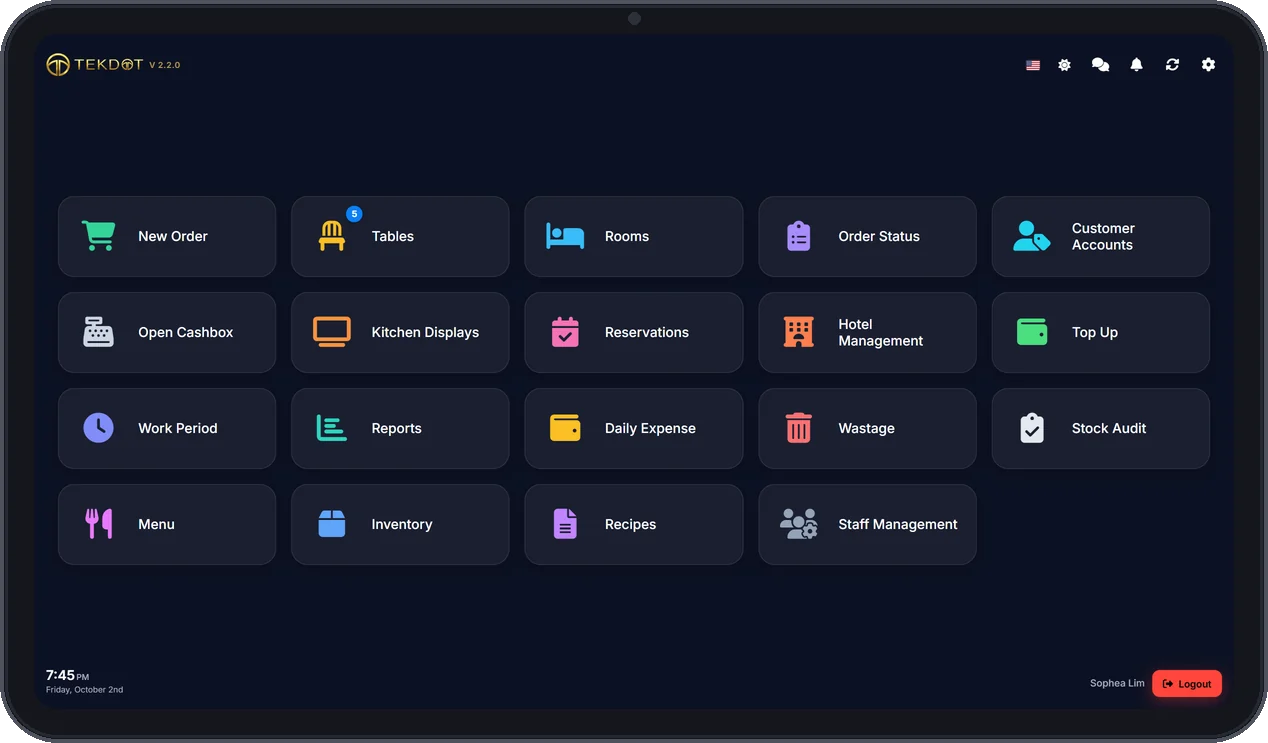
The heart of your restaurant. Full point-of-sale with orders, payments, tables, and reporting in one place. Runs on Windows, Android, and iOS. Connects to KDS, TekDot GO, and TekDot Menu so your whole operation stays in sync.

Dedicated kitchen display for your back-of-house. Large, clear order tickets, station routing (hot kitchen, cold, bar, desserts), color-coded priorities, and prep timers. Built for speed and clarity so the kitchen never misses an order.

Mobile app for waiters to take orders tableside on phone or tablet. Send orders straight to the kitchen display, add modifiers and special requests, and keep service fast. Works on Android and iOS.

A beautiful self-ordering menu for iPad or any tablet. Guests browse your dishes with photos, choose sizes and add-ons, and send orders straight to the kitchen. Built-in smart upselling helps you sell more: it learns from your past orders and recommends what goes well together, so when a guest orders a drink it suggests food, and a main brings up dessert. Every table spends more, with no extra effort from your staff.

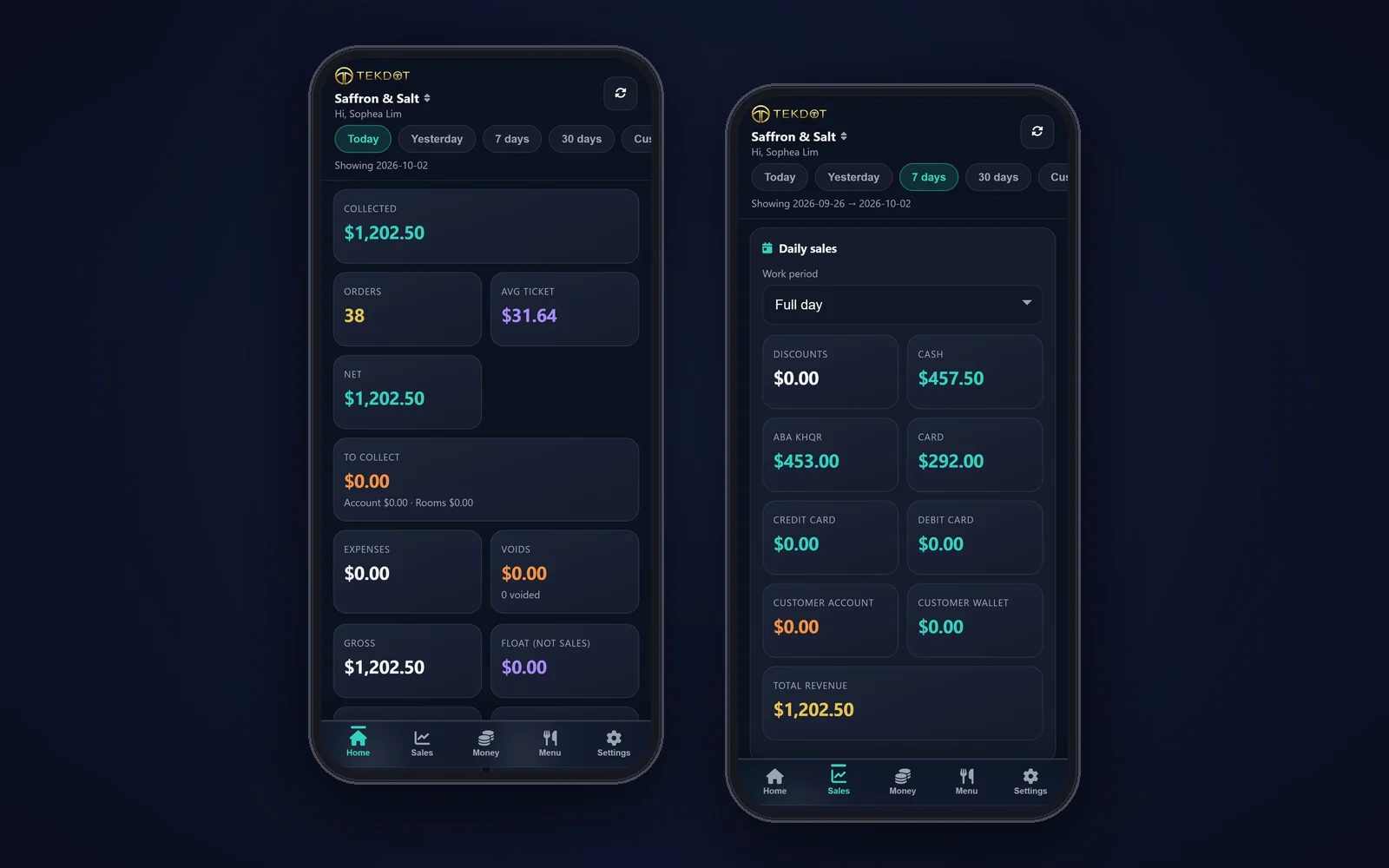
Mobile app for iOS and Android built for owners and managers. See overall reports, sales, inventory, staff performance, and everything you need to run the business—from anywhere. The dashboard in your pocket.

Guests scan the QR code on their table and open your menu on their own phone — no app to download. They browse dishes with photos, order and track their order, chat with staff. Each order arrives on your POS to accept, then goes to the kitchen display. Branded with your restaurant’s name.

Know your profit on every dish — without a spreadsheet. Every sale deducts its recipe from stock, so you see real food cost, waste and margins. Owner analytics, daily sales, items, categories, tables, payments and low-stock alerts are ready whenever you are.

Keep selling when the Wi-Fi dies — tickets still print. A local server keeps orders, payments and the kitchen display running with no internet, then syncs to the cloud the moment you're back online. Lag-free service at rush hour, with your data backed up off-site.
From beachfront resorts to iconic city dining—TekDot powers teams across the region.
Also trusted by Coffee Fruit Cafe · EDS Cafe · Celeste · Marugami Udon · Madame Son (Vietnam) · Ho Lee Fook (Hong Kong) · Papillon (Makati, PH) · GOXO (Makati, PH)
From market stalls to multi-property operators — pick the plan that matches how you run.
Market stalls, kiosks, and food-cart vendors who need fast counter ordering.
Single restaurant with 1–2 registers — dine-in, takeaway, and delivery.
Full-service restaurant or small hotel — floor plans, waiter app, reservations, wallet.
Multiple properties / branches — each on its own subdomain with priority onboarding.
One-time payment for Starter-tier features only (cloud only, needs internet). Includes 1 year of updates; optional $15/mo maintenance after that. Prefer a single capital cost instead of a subscription.
Enterprise and multi-branch deployments get a tailored quote and onboarding.
Contact SalesLet's work together towards the success of our clients. Refer restaurants and earn 25% on every sale — or run your own POS business with our white-label solution.
Example: Close a $990/year Professional deal → you earn $247.50 every year from that client. Get 10+ clients and that's $2,475+/year passive income — month after month, year after year.
$0 — Sign up & share your link
$499 one-time reseller license
Choose your investor type: passive, intermediate, or become an equity partner with share and voting power. Track real-time revenue data and dividends on our secure Investor Platform.
Minimum $100
Minimum $1,000
Share & voting power
Contact us and our team will send you the investor details.
Join thousands of restaurants across Southeast Asia already using TekDot POS
Straight answers if you are comparing point of sale systems for a restaurant, cafe, hotel, or resort.
The best restaurant POS is the one that keeps orders, kitchen, stock, and payments running even when the internet drops. TekDot POS is a complete restaurant operating system — POS, kitchen display, inventory, reservations, and hybrid cloud plus local server on Professional and Enterprise — built from real restaurant operations, not a generic retail till.
TekDot is a restaurant point of sale and operating system that includes POS, kitchen display, inventory, mobile ordering, reservations, rooms, and reporting in one platform.
Yes, on the Professional and Enterprise plans. These run in the cloud and on a local server at your venue, so if the internet goes down, orders, payments, and kitchen display keep working locally, then sync when you are back online. Stall and Starter are cloud-only and need an internet connection.
Plans start at $14.99 per month for Stall, then Starter $49, Professional $99, and Enterprise from $249. Annual billing saves about 17%. A free trial is available.
TekDot is used by restaurants worldwide, with strong coverage in Southeast Asia including Malaysia, Cambodia, the Philippines, Hong Kong, Thailand, Vietnam, and Singapore. It supports multiple languages and local payment methods.
Cash, cards, and regional e-wallets such as ABA, Wing, ACLEDA, GrabPay, Touch n Go, GCash, PayMaya, Alipay, and WeChat Pay, plus split bills, tips, and discounts.
No. TekDot runs in parallel with your current POS while we migrate menus and data and train staff. You keep serving, then go live when the floor is ready — usually within a few days.
TekDot handles the transfer. You say yes — we move menus, inventory, and core business data so everything arrives intact without a DIY rebuild.
Yes. TekDot is built to adjust to the operation — counter, dine-in, hotel rooms, QR ordering, kitchen display, and custom workflows. Sky’s the limit on functionality when your business needs more.